> ## Documentation Index
> Fetch the complete documentation index at: https://docs.anchorbrowser.io/llms.txt
> Use this file to discover all available pages before exploring further.
# Code Tasks
> Write task automation as TypeScript, or hand-edit workflow JSON for fine-grained control.
Most **Automation Tasks** start from a [prompt or demonstration](/tasks/creating-a-task). **Code Tasks** are for authoring automation directly — as TypeScript you upload with the SDK, or as workflow JSON you edit by hand when you need precise control.
## Overview
Code Tasks cover two related paths:
| Path | When to use it |
| -------------------- | ----------------------------------------------------------------------------------------------------------------------------------------------------------------------------------------------------- |
| **TypeScript tasks** | You write a `.ts` file, upload it with the v1 Tasks SDK, and run it in Anchor's task sandbox. |
| **Workflow JSON** | You already have an Automation Task (from a prompt, demonstration, or generation) and need to edit its segment graph via API — for selector fixes, branching, or changes the UI editor can't express. |
For the standard create-from-prompt or demonstration flow, start with [Creating a Task](/tasks/creating-a-task) and [Run a Task](/tasks/run-a-task). Use this page when you are writing or editing code yourself.
## Writing TypeScript task code
For reliable execution, **follow these guidelines:**
* Write your **code in TypeScript.**
* **Export** a single **default async function.**
* In that function, **return** whatever your workflow requires as **output** (e.g., status, messages, domain data).
Tasks can receive values as inputs. **All input names must be prefixed with `ANCHOR_`**
### Basic Task Example
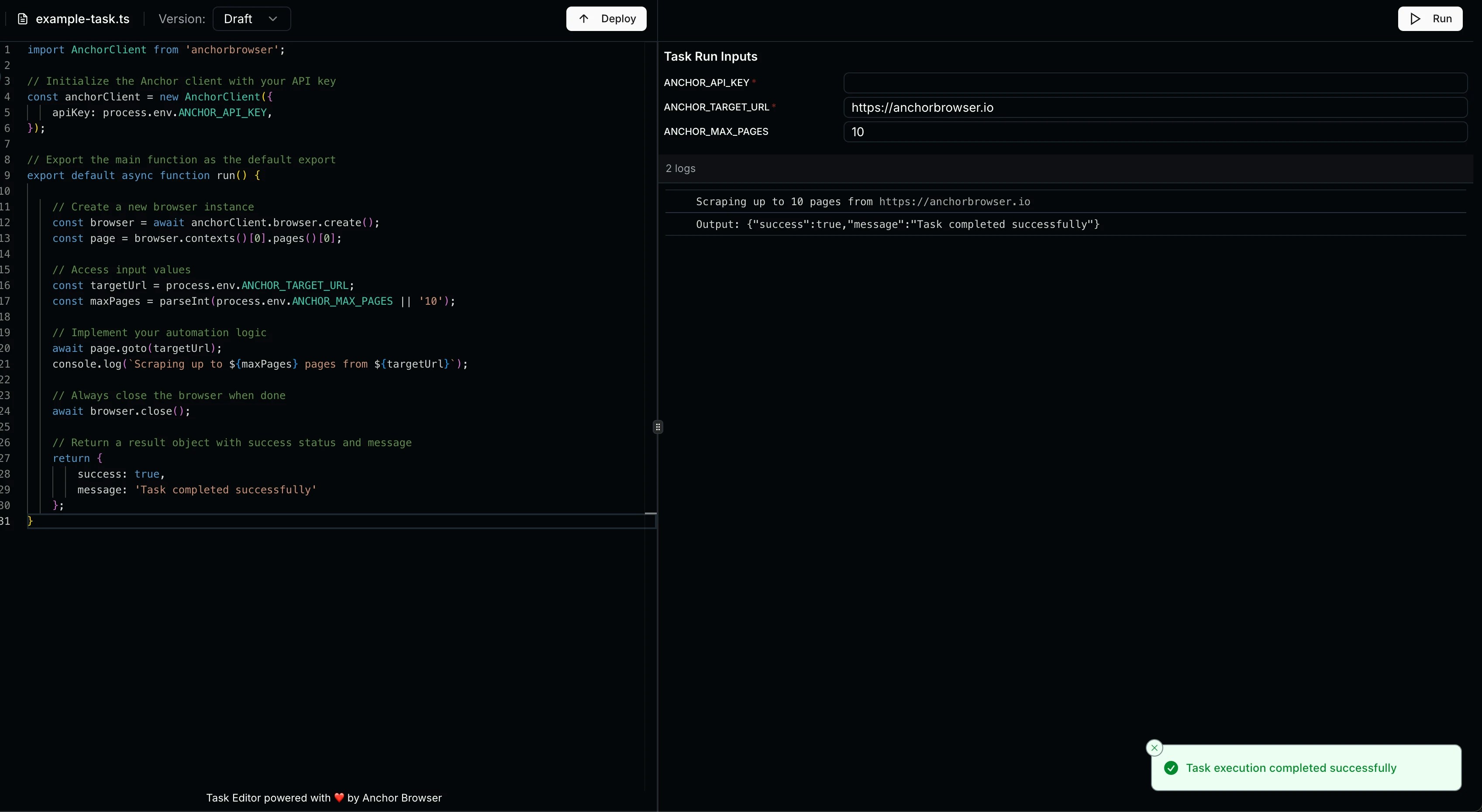
```typescript typescript theme={null}
import AnchorClient from 'anchorbrowser';
// Initialize the Anchor client with your API key
const anchorClient = new AnchorClient({
apiKey: process.env.ANCHOR_API_KEY,
});
// Export the main function as the default export
export default async function run() {
// Create a new browser instance
const browser = await anchorClient.browser.create();
const page = browser.contexts()[0].pages()[0];
// Access input values
const targetUrl = process.env.ANCHOR_TARGET_URL;
const maxPages = parseInt(process.env.ANCHOR_MAX_PAGES || '10');
// Implement your automation logic
await page.goto(targetUrl);
console.log(`Scraping up to ${maxPages} pages from ${targetUrl}`);
// Always close the browser when done
await browser.close();
// Return a result object with success status and message
return {
success: true,
message: 'Task completed successfully'
};
}
```
### Using the SDK
Upload and run a TypeScript Code Task with the v1 Tasks SDK:
Make sure it follows the guidelines from above.
Run the script to show your base64 file version
```bash terminal theme={null}
# Convert your TypeScript file to base64
base64 -i your-task.ts
```
Copy the output for later.
```typescript node.js theme={null}
import Anchorbrowser from 'anchorbrowser';
const client = new Anchorbrowser({
apiKey: process.env.ANCHORBROWSER_API_KEY,
});
// Create a new task
const task = await client.task.create({
name: 'example-task',
language: 'typescript',
description: 'A task to scrape product information from e-commerce sites',
code: "" // Replace with the output of the last step.
});
const taskId = task.data.id
console.log('Task created:', taskId);
```
```python python theme={null}
import os
from anchorbrowser import Anchorbrowser
client = Anchorbrowser(
api_key=os.environ.get("ANCHORBROWSER_API_KEY")
)
# Create a new task
task = client.task.create(
name="example-task",
language="typescript",
description="A task to scrape product information from e-commerce sites",
code="" # Replace with the output of the last step.
)
# Save the id for later
task_id = task.data.id
print(f"Task created: {task_id}")
```
```typescript node.js theme={null}
// Run the task with inputs
const execution = await client.task.run({
taskId: taskId,
version: 'draft',
inputs: {
ANCHOR_TARGET_URL: 'https://example.com',
ANCHOR_MAX_PAGES: '10'
}
});
console.log('Task execution started:', execution.data);
```
```python python theme={null}
# Run the task with inputs
execution = client.task.run(
task_id=task_id,
version="draft",
inputs={
"ANCHOR_TARGET_URL": "https://example.com",
"ANCHOR_MAX_PAGES": "10"
}
)
print(f"Task execution started: {execution.data}")
```
By default, the browser session is automatically closed when the task ends. Set `cleanupSessions: false` to keep the session open after task execution.
 ```typescript node.js theme={null}
// Deploy the task to make it available for production use
const deployment = await client.task.deploy({
taskId: taskId,
code: "", // Replace with the base64 encoded code
language: 'typescript',
description: 'Optional description for this version'
});
console.log('Task deployed:', deployment.data);
```
```python python theme={null}
# Deploy the task to make it available for production use
deployment = client.task.deploy(
task_id=task_id,
code="", # Replace with the base64 encoded code
language="typescript",
description="Optional description for this version"
)
print(f"Task deployed: {deployment.data}")
```
For long-running TypeScript task runs, see [Async execution](/advanced/async-automation-tasks).
## Support
For additional help with Code Tasks:
* [Run a Task](/tasks/run-a-task) — execute Automation Tasks via the v2 API
* Contact Anchor Browser support at [support@anchorbrowser.io](mailto:support@anchorbrowser.io)
## Manually editing workflow JSON
Use this when you already have an Automation Task and need to edit the underlying workflow document via API — for example after [self-healing](/advanced/self-healing) produces a draft, or for changes too detailed for the UI editor. See [Automation Tasks Overview](/tasks/overview#the-workflow-page) for the equivalent workflow in the dashboard.
A workflow is a JSON document describing an ordered graph of **segments** that run against a browser session. Each segment can run deterministic Playwright code, an AI agent, or both. Segment outputs flow forward by parameter name into a shared state, and the workflow's final output is read from that state at the end.
This section covers the JSON schema for hand-editing and the API flow for saving and publishing those edits.
### API process for editing a workflow
Use the `task_id` returned when you created the task, or from a completed [demonstration](/advanced/demonstrations-api) status response.
```bash theme={null}
GET /v1/task/{taskId}/latest
```
The `code` field is base64-encoded. Decode it to get the raw workflow JSON.
Edit the decoded JSON using the schema reference below, re-encode it to base64, then save:
```bash theme={null}
POST /v1/task/{taskId}/draft
{
"code": "",
"language": "workflow"
}
```
```bash theme={null}
POST /v2/tasks/{taskId}/publish-draft
```
### Top-level shape
```json theme={null}
{
"name": "string",
"startSegmentName": "string",
"inputParameters": [ /* Parameter[] */ ],
"outputParameters": [ /* Parameter[] */ ],
"segments": [ /* Segment[] */ ]
}
```
| Field | Description |
| ------------------ | ------------------------------------------------------------------------------- |
| `name` | Human-readable workflow name. |
| `startSegmentName` | The `name` of the segment that runs first. Must match one of `segments[].name`. |
| `inputParameters` | Values supplied by the caller at run time. |
| `outputParameters` | Values returned at the end of the run, read from the shared state by name. |
| `segments` | The segments that make up the graph. |
### Parameter
```json theme={null}
{
"name": "snake_case_key",
"type": "string",
"required": true,
"description": "What this is, in plain language.",
"defaultValue": null,
"options": null
}
```
| Field | Default | Notes |
| -------------- | ------- | -------------------------------------------------------------------------------------------------------------------------------------------------------------------------------------------------------------- |
| `name` | — | The state key. Outputs flow forward by name — an output named `foo` becomes the input `foo` of any later segment that declares it. |
| `type` | — | One of `string`, `number`, `boolean`, `secret`, `file`. `secret` is a string that is masked in logs. `file` carries a base64 data URI; the runtime writes it to a temp path before Playwright `setInputFiles`. |
| `required` | `true` | Required parameters must be present and non-null. For optional parameters, see [Optionality](#optionality-the-most-common-gotcha). |
| `description` | `null` | Read by the AI agent when present. Be concrete and action-oriented. |
| `defaultValue` | `null` | Applied before validation when the value is missing/empty. |
| `options` | `null` | If set, the value must be one of the listed strings (renders a dropdown). Treated as a string at runtime regardless of `type`. |
A minimal parameter is `{ "name": "...", "type": "..." }` — the rest take their defaults.
Use `secret` for credentials, tokens, API keys. Use `file` for user-uploaded attachments — declare it as a workflow input, reference it as `{{parameter_name}}` in prompts and `parameters.parameter_name` in deterministic code. Do not use `string` for binary uploads.
### Segment
```json theme={null}
{
"name": "snake_case_action_name",
"type": "ui",
"prompt": "Plain-English instruction for the agent.",
"inputParameters": [],
"outputParameters": [],
"deterministic": "async (page, parameters) => { /* ... */ return {}; }",
"next": "next_segment_name",
"router": null
}
```
A segment only sees parameters it **declares in `inputParameters`**. The shared state is global, but the segment's `parameters` object at runtime contains only the values the segment opted into. If you forget to declare an input, `parameters.foo` is `undefined`, even if an earlier segment produced `foo`.
#### Segment types
| Type | When to use | `deterministic` | `prompt` | AI fallback if deterministic throws |
| --------- | ------------------------------------------------------------------ | --------------- | -------------- | ----------------------------------- |
| `ui` | DOM interaction, navigation, visible-page extraction (the default) | recommended | required | yes |
| `network` | Reading data out of recorded API responses | required | required | yes |
| `logic` | Deterministic-only control flow / hard errors / invariant checks | required | must be `null` | **no** — segment hard-fails |
| `agent` | Subjective judgment ("best", "most relevant", visual selection) | must be `null` | required | n/a — agent is the only mode |
Rules of thumb:
* Default to `ui`. Reach for `network` only when the response payload is the source of truth (the user said "from API", or UI parsing is brittle).
* Use `logic` when you specifically want **no [AI fallback](/advanced/self-healing#ai-fallback)** — for example, throwing "no results" errors or post-filter validation.
* Use `agent` when deterministic code can't reliably encode the decision.
#### `deterministic`
`deterministic` is a **JSON string** containing a stringified async arrow function — not a live function. Two valid signatures:
```js theme={null}
async (page, parameters) => { /* Playwright */ return { /* outputs */ }; }
async (page, parameters, networkResponses) => { /* network segments */ }
```
* `page` is a Playwright page bound to the active session.
* `parameters` contains all declared `inputParameters` for this segment.
* `networkResponses` (network segments only) — see [Network segments](#network-segments) below.
* The function **must return an object** — use `{}` if there are no outputs.
* Throw on missing/invalid required values; never return `null` placeholders.
Because the function is serialized as a JSON string, escape internal double quotes and keep it on a single line. For example, the function body `await page.goto('https://example.com'); return {};` becomes:
```json theme={null}
"deterministic": "async (page, parameters) => { await page.goto('https://example.com'); return {}; }"
```
#### `prompt`
Plain English for the AI agent. Reference parameters as `{{parameter_name}}` for runtime substitution. Describe the goal in terms of logical actions, not selectors:
* ✅ `"Search Amazon for {{search_query}} and submit."`
* ❌ `"Click button[aria-label=Search], fill input#q, press Enter."`
For `ui`/`network` segments, the prompt is also used as [AI fallback](/advanced/self-healing#ai-fallback) if the deterministic step throws — write it as if it might run on its own.
#### `next` and `router`
* **Linear:** `"next": "next_segment"`.
* **Terminal:** `"next": null` (workflow ends after this segment).
* **Branching:** `"next": ["segment_a", "segment_b"]` plus `"router": "(parameters) => parameters.x ? 'segment_a' : 'segment_b'"`.
The router function receives **only this segment's `outputParameters`** (its own output object), not the merged shared state. If you want to route on a value, that value **must** be declared as an `outputParameter` of the same segment whose `router` reads it.
### Data flow
State is a single flat map keyed by parameter `name`. After a segment runs, its `outputParameters` are merged into that map and made available to every later segment whose `inputParameters` declare the same name. The workflow's `outputParameters` are read from the same map at the end.
Implications:
* Two segments with the same output name **overwrite** each other.
* A segment only reads parameters it explicitly declares in `inputParameters` — declaring an input is opt-in even though the underlying state is shared.
* A router only reads its own segment's outputs — see the warning above.
* If a downstream segment treats an input as `required: true`, the producing segment's output should also be `required: true`, and its deterministic code must throw (not return `null`/empty) when the value is unavailable.
* Demonstration values and static URLs belong **inside the prompt**, not as parameters.
### Network segments
For `type: "network"` segments, the deterministic function receives a third argument — `networkResponses` — containing all responses recorded during the session.
Each entry has fields like `requestUrl`, `method`, `status`, `headers`, and a body. The body field name varies by recorder version, so always read it with the canonical fallback:
```js theme={null}
const rawPayload = entry?.responseBody ?? entry?.body;
```
Match responses with stable predicates (pathname/method/status), not full URL string equality:
```json theme={null}
"deterministic": "async (page, parameters, networkResponses) => { const matches = (networkResponses || []).filter(e => String(e?.requestUrl || '').includes('/api/data') && String(e?.method || '').toUpperCase() === 'GET' && Number(e?.status) === 200); if (!matches.length) throw new Error('Expected /api/data GET 200 response not found'); const last = matches[matches.length - 1]; const rawPayload = last?.responseBody ?? last?.body; if (rawPayload == null) throw new Error(\"Missing required output 'result' from response payload\"); const json = typeof rawPayload === 'string' ? JSON.parse(rawPayload) : rawPayload; return { result: JSON.stringify(json) }; }"
```
Do not use `page.waitForResponse` inside a workflow segment — `networkResponses` is the deterministic source of truth.
### Reliability patterns
These are the highest-leverage rules for hand-written deterministic code.
#### Split navigation from interaction
Always put `page.goto(url)` in its own segment. Element waits, fills, and clicks belong in the next segment.
* ❌ `nav_open_and_fill_search` — navigation + interaction in one segment
* ✅ `nav_to_search_page` → `fill_search_form`
The page load is handled automatically by the browser; do not call `page.waitForLoadState('networkidle')` after `page.goto`. The next segment handles waiting for specific elements to appear. Splitting them makes segments reusable and resilient to timing issues.
#### Click and input stability
For any element that may be off-screen or in a virtual list, use the canonical pattern:
```js theme={null}
const el = page.locator('selector');
await el.waitFor({ state: 'attached', timeout: 30000 });
await el.scrollIntoViewIfNeeded();
await el.click();
```
* `state: 'attached'` waits for DOM presence even when the element is off-screen. The default `state: 'visible'` breaks on virtual lists.
* For text inputs (`input`, `textarea`, contenteditable), click/focus first, then `fill()` or `type()`.
#### Selector quality
Prefer stable attributes in this order: `data-testid` → `aria-label` → `name` → semantic role + text. Scope selectors to a relevant region before text matching; avoid global `.first()` unless uniqueness is guaranteed.
### Optionality (the most common gotcha)
The schema validator accepts `undefined` (i.e. a missing key) for optional fields, **not `null`**. An AI agent producing structured JSON tends to emit `"field": null` for "absent", which fails validation — especially for optional fields with `options` (enums).
Three patterns that work:
**1. Route around it.** Declare the optional value as an `outputParameter` of the segment whose `router` will read it, so the router can branch *before* the consuming segment ever runs. The consuming segment can then treat the input as required.
```json theme={null}
{
"name": "get_task_details",
"type": "ui",
"prompt": "Read the task and return its current estimation if any.",
"inputParameters": [],
"outputParameters": [
{ "name": "estimation", "type": "number", "required": true, "description": "Current estimation, or 0 if none." }
],
"deterministic": "async (page, parameters) => { /* read DOM, default to 0 */ return { estimation: 0 }; }",
"next": ["set_estimation", "skip_estimation"],
"router": "(parameters) => parameters.estimation > 0 ? 'set_estimation' : 'skip_estimation'"
}
```
Note that `parameters.estimation` here refers to **this segment's own output**, which is what the router receives.
**2. Add an explicit "none" option.** For optional enums, include a sentinel like `"none"` in `options` and make the field `required: true`. The agent will pick `"none"` instead of `null`.
**3. Omit the key.** If you control the deterministic code, return `{}` (omit the key entirely) instead of `{ field: null }`.
### Identity-linked workflows
When an [identity](/essentials/authenticated-applications) is attached to the workflow, the platform pre-authenticates the session before the workflow runs. In that case:
* **Do not** declare `username`, `password`, `otp_code`, `totp_secret`, `mfa_code`, login `email`, or any other auth credential as an `inputParameter`.
* **Do not** add login segments to the workflow — login is handled before your first segment runs.
* Treat any login actions you saw during recording as pre-conditions performed by the platform, not as part of the user's task.
* Only declare business-logic parameters the user actually needs to provide at runtime (e.g. `report_name`, `invoice_number`, `search_query`).
### Authoring checklist
* [ ] Every segment has a `type`.
* [ ] `logic` segments have `prompt: null` and a non-null `deterministic`.
* [ ] `agent` segments have `deterministic: null` and a comprehensive `prompt`.
* [ ] Every value referenced in a `router` is declared as an `outputParameter` **of the same segment** as the router.
* [ ] Every value a segment uses is declared in its `inputParameters`.
* [ ] Required downstream inputs come from required upstream outputs; deterministic code throws instead of returning `null` for them.
* [ ] Optional values are handled by routing, an explicit `"none"` option, or by omitting the key — not by emitting `null`.
* [ ] Prompts use `{{parameter_name}}` for dynamic values; static URLs and demonstration values are embedded in the prompt, not declared as parameters.
* [ ] `secret` for credentials/tokens; `file` for user-uploaded attachments.
* [ ] Navigation segments do `page.goto` only — element waits and interactions live in the next segment.
* [ ] `next: null` only on terminal segments; otherwise a single string or an array paired with a `router`.
* [ ] `deterministic` is a JSON string with quotes escaped, on a single line.
* [ ] If an identity is attached, no auth credentials are declared as parameters.
### Complete example
A two-input, two-output workflow that searches Amazon and extracts the first result.
```json theme={null}
{
"name": "amazon_price_check",
"startSegmentName": "nav_to_amazon",
"inputParameters": [
{ "name": "search_query", "type": "string", "required": true, "description": "Product to search for", "defaultValue": null, "options": null },
{ "name": "max_price", "type": "number", "required": false, "description": "Optional price ceiling (USD)", "defaultValue": null, "options": null }
],
"outputParameters": [
{ "name": "top_result_title", "type": "string", "required": true, "description": "Title of the first matching product", "defaultValue": null, "options": null },
{ "name": "top_result_price", "type": "number", "required": false, "description": "Price of the first matching product", "defaultValue": null, "options": null }
],
"segments": [
{
"name": "nav_to_amazon",
"type": "ui",
"prompt": "Navigate to https://www.amazon.com/.",
"inputParameters": [],
"outputParameters": [],
"deterministic": "async (page, parameters) => { await page.goto('https://www.amazon.com/'); return {}; }",
"next": "search_product",
"router": null
},
{
"name": "search_product",
"type": "ui",
"prompt": "Type {{search_query}} into the search box and submit.",
"inputParameters": [
{ "name": "search_query", "type": "string", "required": true, "description": "Product to search for", "defaultValue": null, "options": null }
],
"outputParameters": [],
"deterministic": "async (page, parameters) => { const input = page.locator('#twotabsearchtextbox'); await input.waitFor({ state: 'attached', timeout: 30000 }); await input.fill(parameters.search_query); await page.keyboard.press('Enter'); return {}; }",
"next": "extract_top_result",
"router": null
},
{
"name": "extract_top_result",
"type": "ui",
"prompt": "Extract the title and price of the first product result. Return them as { top_result_title, top_result_price }.",
"inputParameters": [],
"outputParameters": [
{ "name": "top_result_title", "type": "string", "required": true, "description": "First result title", "defaultValue": null, "options": null },
{ "name": "top_result_price", "type": "number", "required": false, "description": "First result price", "defaultValue": null, "options": null }
],
"deterministic": "async (page, parameters) => { const card = page.locator('[data-component-type=\"s-search-result\"]').first(); await card.waitFor({ state: 'attached', timeout: 30000 }); const title = (await card.locator('h2 span').first().textContent())?.trim(); const priceText = (await card.locator('.a-price > .a-offscreen').first().textContent())?.replace(/[^0-9.]/g, ''); const price = priceText ? Number(priceText) : undefined; if (!title) throw new Error(\"Missing required output 'top_result_title' from extract_top_result/h2\"); return { top_result_title: title, top_result_price: price }; }",
"next": null,
"router": null
}
]
}
```
```typescript node.js theme={null}
// Deploy the task to make it available for production use
const deployment = await client.task.deploy({
taskId: taskId,
code: "", // Replace with the base64 encoded code
language: 'typescript',
description: 'Optional description for this version'
});
console.log('Task deployed:', deployment.data);
```
```python python theme={null}
# Deploy the task to make it available for production use
deployment = client.task.deploy(
task_id=task_id,
code="", # Replace with the base64 encoded code
language="typescript",
description="Optional description for this version"
)
print(f"Task deployed: {deployment.data}")
```
For long-running TypeScript task runs, see [Async execution](/advanced/async-automation-tasks).
## Support
For additional help with Code Tasks:
* [Run a Task](/tasks/run-a-task) — execute Automation Tasks via the v2 API
* Contact Anchor Browser support at [support@anchorbrowser.io](mailto:support@anchorbrowser.io)
## Manually editing workflow JSON
Use this when you already have an Automation Task and need to edit the underlying workflow document via API — for example after [self-healing](/advanced/self-healing) produces a draft, or for changes too detailed for the UI editor. See [Automation Tasks Overview](/tasks/overview#the-workflow-page) for the equivalent workflow in the dashboard.
A workflow is a JSON document describing an ordered graph of **segments** that run against a browser session. Each segment can run deterministic Playwright code, an AI agent, or both. Segment outputs flow forward by parameter name into a shared state, and the workflow's final output is read from that state at the end.
This section covers the JSON schema for hand-editing and the API flow for saving and publishing those edits.
### API process for editing a workflow
Use the `task_id` returned when you created the task, or from a completed [demonstration](/advanced/demonstrations-api) status response.
```bash theme={null}
GET /v1/task/{taskId}/latest
```
The `code` field is base64-encoded. Decode it to get the raw workflow JSON.
Edit the decoded JSON using the schema reference below, re-encode it to base64, then save:
```bash theme={null}
POST /v1/task/{taskId}/draft
{
"code": "",
"language": "workflow"
}
```
```bash theme={null}
POST /v2/tasks/{taskId}/publish-draft
```
### Top-level shape
```json theme={null}
{
"name": "string",
"startSegmentName": "string",
"inputParameters": [ /* Parameter[] */ ],
"outputParameters": [ /* Parameter[] */ ],
"segments": [ /* Segment[] */ ]
}
```
| Field | Description |
| ------------------ | ------------------------------------------------------------------------------- |
| `name` | Human-readable workflow name. |
| `startSegmentName` | The `name` of the segment that runs first. Must match one of `segments[].name`. |
| `inputParameters` | Values supplied by the caller at run time. |
| `outputParameters` | Values returned at the end of the run, read from the shared state by name. |
| `segments` | The segments that make up the graph. |
### Parameter
```json theme={null}
{
"name": "snake_case_key",
"type": "string",
"required": true,
"description": "What this is, in plain language.",
"defaultValue": null,
"options": null
}
```
| Field | Default | Notes |
| -------------- | ------- | -------------------------------------------------------------------------------------------------------------------------------------------------------------------------------------------------------------- |
| `name` | — | The state key. Outputs flow forward by name — an output named `foo` becomes the input `foo` of any later segment that declares it. |
| `type` | — | One of `string`, `number`, `boolean`, `secret`, `file`. `secret` is a string that is masked in logs. `file` carries a base64 data URI; the runtime writes it to a temp path before Playwright `setInputFiles`. |
| `required` | `true` | Required parameters must be present and non-null. For optional parameters, see [Optionality](#optionality-the-most-common-gotcha). |
| `description` | `null` | Read by the AI agent when present. Be concrete and action-oriented. |
| `defaultValue` | `null` | Applied before validation when the value is missing/empty. |
| `options` | `null` | If set, the value must be one of the listed strings (renders a dropdown). Treated as a string at runtime regardless of `type`. |
A minimal parameter is `{ "name": "...", "type": "..." }` — the rest take their defaults.
Use `secret` for credentials, tokens, API keys. Use `file` for user-uploaded attachments — declare it as a workflow input, reference it as `{{parameter_name}}` in prompts and `parameters.parameter_name` in deterministic code. Do not use `string` for binary uploads.
### Segment
```json theme={null}
{
"name": "snake_case_action_name",
"type": "ui",
"prompt": "Plain-English instruction for the agent.",
"inputParameters": [],
"outputParameters": [],
"deterministic": "async (page, parameters) => { /* ... */ return {}; }",
"next": "next_segment_name",
"router": null
}
```
A segment only sees parameters it **declares in `inputParameters`**. The shared state is global, but the segment's `parameters` object at runtime contains only the values the segment opted into. If you forget to declare an input, `parameters.foo` is `undefined`, even if an earlier segment produced `foo`.
#### Segment types
| Type | When to use | `deterministic` | `prompt` | AI fallback if deterministic throws |
| --------- | ------------------------------------------------------------------ | --------------- | -------------- | ----------------------------------- |
| `ui` | DOM interaction, navigation, visible-page extraction (the default) | recommended | required | yes |
| `network` | Reading data out of recorded API responses | required | required | yes |
| `logic` | Deterministic-only control flow / hard errors / invariant checks | required | must be `null` | **no** — segment hard-fails |
| `agent` | Subjective judgment ("best", "most relevant", visual selection) | must be `null` | required | n/a — agent is the only mode |
Rules of thumb:
* Default to `ui`. Reach for `network` only when the response payload is the source of truth (the user said "from API", or UI parsing is brittle).
* Use `logic` when you specifically want **no [AI fallback](/advanced/self-healing#ai-fallback)** — for example, throwing "no results" errors or post-filter validation.
* Use `agent` when deterministic code can't reliably encode the decision.
#### `deterministic`
`deterministic` is a **JSON string** containing a stringified async arrow function — not a live function. Two valid signatures:
```js theme={null}
async (page, parameters) => { /* Playwright */ return { /* outputs */ }; }
async (page, parameters, networkResponses) => { /* network segments */ }
```
* `page` is a Playwright page bound to the active session.
* `parameters` contains all declared `inputParameters` for this segment.
* `networkResponses` (network segments only) — see [Network segments](#network-segments) below.
* The function **must return an object** — use `{}` if there are no outputs.
* Throw on missing/invalid required values; never return `null` placeholders.
Because the function is serialized as a JSON string, escape internal double quotes and keep it on a single line. For example, the function body `await page.goto('https://example.com'); return {};` becomes:
```json theme={null}
"deterministic": "async (page, parameters) => { await page.goto('https://example.com'); return {}; }"
```
#### `prompt`
Plain English for the AI agent. Reference parameters as `{{parameter_name}}` for runtime substitution. Describe the goal in terms of logical actions, not selectors:
* ✅ `"Search Amazon for {{search_query}} and submit."`
* ❌ `"Click button[aria-label=Search], fill input#q, press Enter."`
For `ui`/`network` segments, the prompt is also used as [AI fallback](/advanced/self-healing#ai-fallback) if the deterministic step throws — write it as if it might run on its own.
#### `next` and `router`
* **Linear:** `"next": "next_segment"`.
* **Terminal:** `"next": null` (workflow ends after this segment).
* **Branching:** `"next": ["segment_a", "segment_b"]` plus `"router": "(parameters) => parameters.x ? 'segment_a' : 'segment_b'"`.
The router function receives **only this segment's `outputParameters`** (its own output object), not the merged shared state. If you want to route on a value, that value **must** be declared as an `outputParameter` of the same segment whose `router` reads it.
### Data flow
State is a single flat map keyed by parameter `name`. After a segment runs, its `outputParameters` are merged into that map and made available to every later segment whose `inputParameters` declare the same name. The workflow's `outputParameters` are read from the same map at the end.
Implications:
* Two segments with the same output name **overwrite** each other.
* A segment only reads parameters it explicitly declares in `inputParameters` — declaring an input is opt-in even though the underlying state is shared.
* A router only reads its own segment's outputs — see the warning above.
* If a downstream segment treats an input as `required: true`, the producing segment's output should also be `required: true`, and its deterministic code must throw (not return `null`/empty) when the value is unavailable.
* Demonstration values and static URLs belong **inside the prompt**, not as parameters.
### Network segments
For `type: "network"` segments, the deterministic function receives a third argument — `networkResponses` — containing all responses recorded during the session.
Each entry has fields like `requestUrl`, `method`, `status`, `headers`, and a body. The body field name varies by recorder version, so always read it with the canonical fallback:
```js theme={null}
const rawPayload = entry?.responseBody ?? entry?.body;
```
Match responses with stable predicates (pathname/method/status), not full URL string equality:
```json theme={null}
"deterministic": "async (page, parameters, networkResponses) => { const matches = (networkResponses || []).filter(e => String(e?.requestUrl || '').includes('/api/data') && String(e?.method || '').toUpperCase() === 'GET' && Number(e?.status) === 200); if (!matches.length) throw new Error('Expected /api/data GET 200 response not found'); const last = matches[matches.length - 1]; const rawPayload = last?.responseBody ?? last?.body; if (rawPayload == null) throw new Error(\"Missing required output 'result' from response payload\"); const json = typeof rawPayload === 'string' ? JSON.parse(rawPayload) : rawPayload; return { result: JSON.stringify(json) }; }"
```
Do not use `page.waitForResponse` inside a workflow segment — `networkResponses` is the deterministic source of truth.
### Reliability patterns
These are the highest-leverage rules for hand-written deterministic code.
#### Split navigation from interaction
Always put `page.goto(url)` in its own segment. Element waits, fills, and clicks belong in the next segment.
* ❌ `nav_open_and_fill_search` — navigation + interaction in one segment
* ✅ `nav_to_search_page` → `fill_search_form`
The page load is handled automatically by the browser; do not call `page.waitForLoadState('networkidle')` after `page.goto`. The next segment handles waiting for specific elements to appear. Splitting them makes segments reusable and resilient to timing issues.
#### Click and input stability
For any element that may be off-screen or in a virtual list, use the canonical pattern:
```js theme={null}
const el = page.locator('selector');
await el.waitFor({ state: 'attached', timeout: 30000 });
await el.scrollIntoViewIfNeeded();
await el.click();
```
* `state: 'attached'` waits for DOM presence even when the element is off-screen. The default `state: 'visible'` breaks on virtual lists.
* For text inputs (`input`, `textarea`, contenteditable), click/focus first, then `fill()` or `type()`.
#### Selector quality
Prefer stable attributes in this order: `data-testid` → `aria-label` → `name` → semantic role + text. Scope selectors to a relevant region before text matching; avoid global `.first()` unless uniqueness is guaranteed.
### Optionality (the most common gotcha)
The schema validator accepts `undefined` (i.e. a missing key) for optional fields, **not `null`**. An AI agent producing structured JSON tends to emit `"field": null` for "absent", which fails validation — especially for optional fields with `options` (enums).
Three patterns that work:
**1. Route around it.** Declare the optional value as an `outputParameter` of the segment whose `router` will read it, so the router can branch *before* the consuming segment ever runs. The consuming segment can then treat the input as required.
```json theme={null}
{
"name": "get_task_details",
"type": "ui",
"prompt": "Read the task and return its current estimation if any.",
"inputParameters": [],
"outputParameters": [
{ "name": "estimation", "type": "number", "required": true, "description": "Current estimation, or 0 if none." }
],
"deterministic": "async (page, parameters) => { /* read DOM, default to 0 */ return { estimation: 0 }; }",
"next": ["set_estimation", "skip_estimation"],
"router": "(parameters) => parameters.estimation > 0 ? 'set_estimation' : 'skip_estimation'"
}
```
Note that `parameters.estimation` here refers to **this segment's own output**, which is what the router receives.
**2. Add an explicit "none" option.** For optional enums, include a sentinel like `"none"` in `options` and make the field `required: true`. The agent will pick `"none"` instead of `null`.
**3. Omit the key.** If you control the deterministic code, return `{}` (omit the key entirely) instead of `{ field: null }`.
### Identity-linked workflows
When an [identity](/essentials/authenticated-applications) is attached to the workflow, the platform pre-authenticates the session before the workflow runs. In that case:
* **Do not** declare `username`, `password`, `otp_code`, `totp_secret`, `mfa_code`, login `email`, or any other auth credential as an `inputParameter`.
* **Do not** add login segments to the workflow — login is handled before your first segment runs.
* Treat any login actions you saw during recording as pre-conditions performed by the platform, not as part of the user's task.
* Only declare business-logic parameters the user actually needs to provide at runtime (e.g. `report_name`, `invoice_number`, `search_query`).
### Authoring checklist
* [ ] Every segment has a `type`.
* [ ] `logic` segments have `prompt: null` and a non-null `deterministic`.
* [ ] `agent` segments have `deterministic: null` and a comprehensive `prompt`.
* [ ] Every value referenced in a `router` is declared as an `outputParameter` **of the same segment** as the router.
* [ ] Every value a segment uses is declared in its `inputParameters`.
* [ ] Required downstream inputs come from required upstream outputs; deterministic code throws instead of returning `null` for them.
* [ ] Optional values are handled by routing, an explicit `"none"` option, or by omitting the key — not by emitting `null`.
* [ ] Prompts use `{{parameter_name}}` for dynamic values; static URLs and demonstration values are embedded in the prompt, not declared as parameters.
* [ ] `secret` for credentials/tokens; `file` for user-uploaded attachments.
* [ ] Navigation segments do `page.goto` only — element waits and interactions live in the next segment.
* [ ] `next: null` only on terminal segments; otherwise a single string or an array paired with a `router`.
* [ ] `deterministic` is a JSON string with quotes escaped, on a single line.
* [ ] If an identity is attached, no auth credentials are declared as parameters.
### Complete example
A two-input, two-output workflow that searches Amazon and extracts the first result.
```json theme={null}
{
"name": "amazon_price_check",
"startSegmentName": "nav_to_amazon",
"inputParameters": [
{ "name": "search_query", "type": "string", "required": true, "description": "Product to search for", "defaultValue": null, "options": null },
{ "name": "max_price", "type": "number", "required": false, "description": "Optional price ceiling (USD)", "defaultValue": null, "options": null }
],
"outputParameters": [
{ "name": "top_result_title", "type": "string", "required": true, "description": "Title of the first matching product", "defaultValue": null, "options": null },
{ "name": "top_result_price", "type": "number", "required": false, "description": "Price of the first matching product", "defaultValue": null, "options": null }
],
"segments": [
{
"name": "nav_to_amazon",
"type": "ui",
"prompt": "Navigate to https://www.amazon.com/.",
"inputParameters": [],
"outputParameters": [],
"deterministic": "async (page, parameters) => { await page.goto('https://www.amazon.com/'); return {}; }",
"next": "search_product",
"router": null
},
{
"name": "search_product",
"type": "ui",
"prompt": "Type {{search_query}} into the search box and submit.",
"inputParameters": [
{ "name": "search_query", "type": "string", "required": true, "description": "Product to search for", "defaultValue": null, "options": null }
],
"outputParameters": [],
"deterministic": "async (page, parameters) => { const input = page.locator('#twotabsearchtextbox'); await input.waitFor({ state: 'attached', timeout: 30000 }); await input.fill(parameters.search_query); await page.keyboard.press('Enter'); return {}; }",
"next": "extract_top_result",
"router": null
},
{
"name": "extract_top_result",
"type": "ui",
"prompt": "Extract the title and price of the first product result. Return them as { top_result_title, top_result_price }.",
"inputParameters": [],
"outputParameters": [
{ "name": "top_result_title", "type": "string", "required": true, "description": "First result title", "defaultValue": null, "options": null },
{ "name": "top_result_price", "type": "number", "required": false, "description": "First result price", "defaultValue": null, "options": null }
],
"deterministic": "async (page, parameters) => { const card = page.locator('[data-component-type=\"s-search-result\"]').first(); await card.waitFor({ state: 'attached', timeout: 30000 }); const title = (await card.locator('h2 span').first().textContent())?.trim(); const priceText = (await card.locator('.a-price > .a-offscreen').first().textContent())?.replace(/[^0-9.]/g, ''); const price = priceText ? Number(priceText) : undefined; if (!title) throw new Error(\"Missing required output 'top_result_title' from extract_top_result/h2\"); return { top_result_title: title, top_result_price: price }; }",
"next": null,
"router": null
}
]
}
```