

Most Automation Tasks start from a prompt or demonstration. Code Tasks are for authoring automation directly — as TypeScript you upload with the SDK, or as workflow JSON you edit by hand when you need precise control.
Overview
Code Tasks cover two related paths:
For the standard create-from-prompt or demonstration flow, start with Creating a Task and Run a Task. Use this page when you are writing or editing code yourself.
Writing TypeScript task code
For reliable execution, follow these guidelines:- Write your code in TypeScript.
- Export a single default async function.
- In that function, return whatever your workflow requires as output (e.g., status, messages, domain data).
Tasks can receive values as inputs. All input names must be prefixed with
ANCHOR_Basic Task Example
Using the SDK
Upload and run a TypeScript Code Task with the v1 Tasks SDK:1
Save your typescript code as a .ts file
2
Get the base64 version of the file
Run the script to show your base64 file versionCopy the output for later.
terminal
3
Create your Code Task in Anchor
4
Run the Code Task
By default, the browser session is automatically closed when the task ends. Set
cleanupSessions: false to keep the session open after task execution.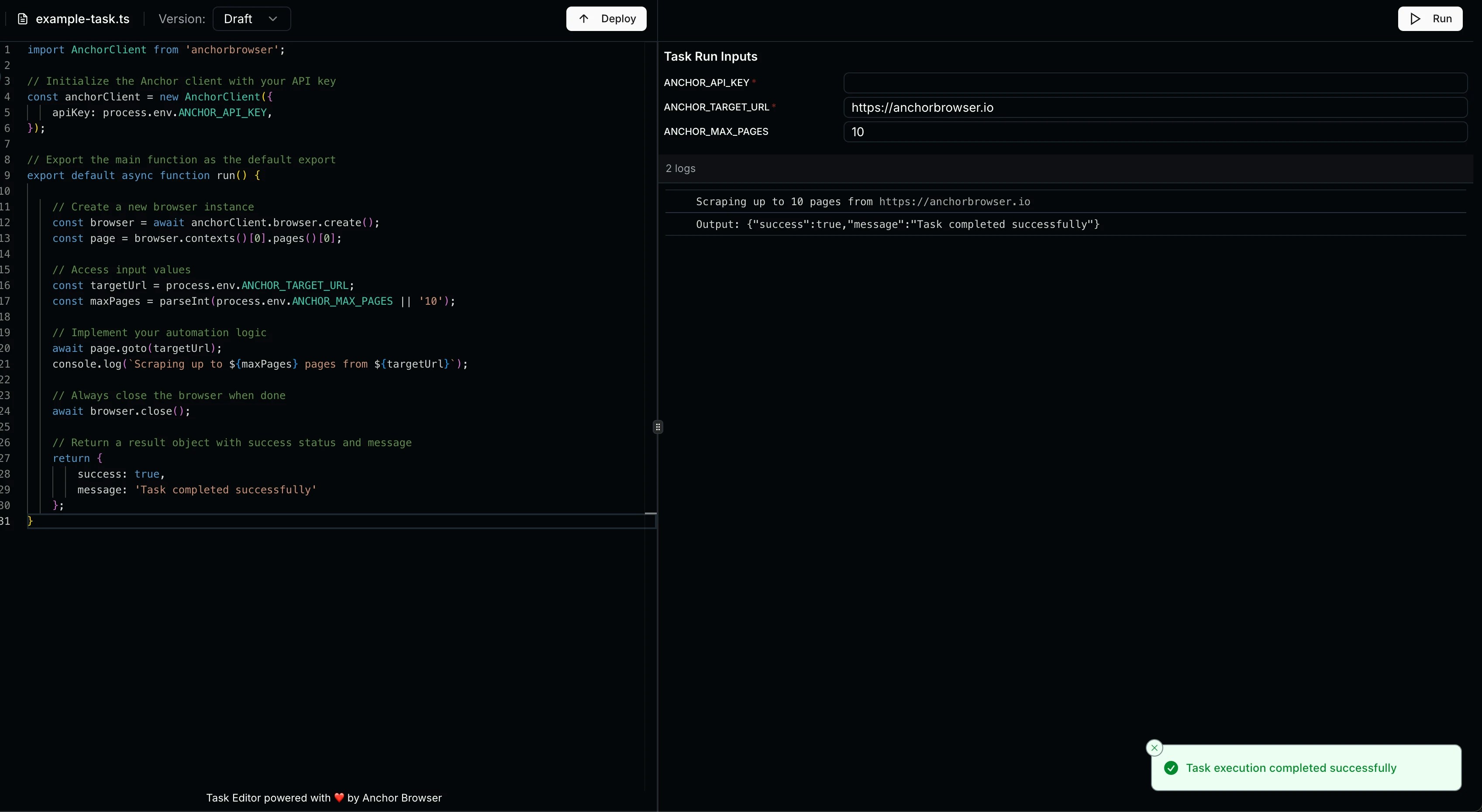
5
Deploy the Code Task
Support
For additional help with Code Tasks:- Run a Task — execute Automation Tasks via the v2 API
- Contact Anchor Browser support at support@anchorbrowser.io
Manually editing workflow JSON
Use this when you already have an Automation Task and need to edit the underlying workflow document via API — for example after self-healing produces a draft, or for changes too detailed for the UI editor. See Automation Tasks Overview for the equivalent workflow in the dashboard.
API process for editing a workflow
1
Get the task ID
Use the
task_id returned when you created the task, or from a completed demonstration status response.2
Read the current workflow JSON
code field is base64-encoded. Decode it to get the raw workflow JSON.3
Edit and save as draft
Edit the decoded JSON using the schema reference below, re-encode it to base64, then save:
4
Publish the draft
Top-level shape
Parameter
A minimal parameter is
{ "name": "...", "type": "..." } — the rest take their defaults.
Use
secret for credentials, tokens, API keys. Use file for user-uploaded attachments — declare it as a workflow input, reference it as {{parameter_name}} in prompts and parameters.parameter_name in deterministic code. Do not use string for binary uploads.Segment
inputParameters. The shared state is global, but the segment’s parameters object at runtime contains only the values the segment opted into. If you forget to declare an input, parameters.foo is undefined, even if an earlier segment produced foo.
Segment types
Rules of thumb:
- Default to
ui. Reach fornetworkonly when the response payload is the source of truth (the user said “from API”, or UI parsing is brittle). - Use
logicwhen you specifically want no AI fallback — for example, throwing “no results” errors or post-filter validation. - Use
agentwhen deterministic code can’t reliably encode the decision.
deterministic
deterministic is a JSON string containing a stringified async arrow function — not a live function. Two valid signatures:
pageis a Playwright page bound to the active session.parameterscontains all declaredinputParametersfor this segment.networkResponses(network segments only) — see Network segments below.- The function must return an object — use
{}if there are no outputs. - Throw on missing/invalid required values; never return
nullplaceholders.
await page.goto('https://example.com'); return {}; becomes:
prompt
Plain English for the AI agent. Reference parameters as {{parameter_name}} for runtime substitution. Describe the goal in terms of logical actions, not selectors:
- ✅
"Search Amazon for {{search_query}} and submit." - ❌
"Click button[aria-label=Search], fill input#q, press Enter."
ui/network segments, the prompt is also used as AI fallback if the deterministic step throws — write it as if it might run on its own.
next and router
- Linear:
"next": "next_segment". - Terminal:
"next": null(workflow ends after this segment). - Branching:
"next": ["segment_a", "segment_b"]plus"router": "(parameters) => parameters.x ? 'segment_a' : 'segment_b'".
Data flow
State is a single flat map keyed by parametername. After a segment runs, its outputParameters are merged into that map and made available to every later segment whose inputParameters declare the same name. The workflow’s outputParameters are read from the same map at the end.
Implications:
- Two segments with the same output name overwrite each other.
- A segment only reads parameters it explicitly declares in
inputParameters— declaring an input is opt-in even though the underlying state is shared. - A router only reads its own segment’s outputs — see the warning above.
- If a downstream segment treats an input as
required: true, the producing segment’s output should also berequired: true, and its deterministic code must throw (not returnnull/empty) when the value is unavailable. - Demonstration values and static URLs belong inside the prompt, not as parameters.
Network segments
Fortype: "network" segments, the deterministic function receives a third argument — networkResponses — containing all responses recorded during the session.
Each entry has fields like requestUrl, method, status, headers, and a body. The body field name varies by recorder version, so always read it with the canonical fallback:
page.waitForResponse inside a workflow segment — networkResponses is the deterministic source of truth.
Reliability patterns
These are the highest-leverage rules for hand-written deterministic code.Split navigation from interaction
Always putpage.goto(url) in its own segment. Element waits, fills, and clicks belong in the next segment.
- ❌
nav_open_and_fill_search— navigation + interaction in one segment - ✅
nav_to_search_page→fill_search_form
page.waitForLoadState('networkidle') after page.goto. The next segment handles waiting for specific elements to appear. Splitting them makes segments reusable and resilient to timing issues.
Click and input stability
For any element that may be off-screen or in a virtual list, use the canonical pattern:state: 'attached'waits for DOM presence even when the element is off-screen. The defaultstate: 'visible'breaks on virtual lists.- For text inputs (
input,textarea, contenteditable), click/focus first, thenfill()ortype().
Selector quality
Prefer stable attributes in this order:data-testid → aria-label → name → semantic role + text. Scope selectors to a relevant region before text matching; avoid global .first() unless uniqueness is guaranteed.
Optionality (the most common gotcha)
The schema validator acceptsundefined (i.e. a missing key) for optional fields, not null. An AI agent producing structured JSON tends to emit "field": null for “absent”, which fails validation — especially for optional fields with options (enums).
Three patterns that work:
1. Route around it. Declare the optional value as an outputParameter of the segment whose router will read it, so the router can branch before the consuming segment ever runs. The consuming segment can then treat the input as required.
parameters.estimation here refers to this segment’s own output, which is what the router receives.
2. Add an explicit “none” option. For optional enums, include a sentinel like "none" in options and make the field required: true. The agent will pick "none" instead of null.
3. Omit the key. If you control the deterministic code, return {} (omit the key entirely) instead of { field: null }.
Identity-linked workflows
When an identity is attached to the workflow, the platform pre-authenticates the session before the workflow runs. In that case:- Do not declare
username,password,otp_code,totp_secret,mfa_code, loginemail, or any other auth credential as aninputParameter. - Do not add login segments to the workflow — login is handled before your first segment runs.
- Treat any login actions you saw during recording as pre-conditions performed by the platform, not as part of the user’s task.
- Only declare business-logic parameters the user actually needs to provide at runtime (e.g.
report_name,invoice_number,search_query).
Authoring checklist
- Every segment has a
type. -
logicsegments haveprompt: nulland a non-nulldeterministic. -
agentsegments havedeterministic: nulland a comprehensiveprompt. - Every value referenced in a
routeris declared as anoutputParameterof the same segment as the router. - Every value a segment uses is declared in its
inputParameters. - Required downstream inputs come from required upstream outputs; deterministic code throws instead of returning
nullfor them. - Optional values are handled by routing, an explicit
"none"option, or by omitting the key — not by emittingnull. - Prompts use
{{parameter_name}}for dynamic values; static URLs and demonstration values are embedded in the prompt, not declared as parameters. -
secretfor credentials/tokens;filefor user-uploaded attachments. - Navigation segments do
page.gotoonly — element waits and interactions live in the next segment. -
next: nullonly on terminal segments; otherwise a single string or an array paired with arouter. -
deterministicis a JSON string with quotes escaped, on a single line. - If an identity is attached, no auth credentials are declared as parameters.