Overview
The Tasks API enables you to create, version, and execute reusable browser automation code in your Anchor Browser sessions. Tasks allow you to:

Tasks are executed in a secure sandbox environment and can access the full Anchor Browser API for automation capabilities.
Creating Your First Task
Writing Task Code
For reliable execution, follow these guidelines:
- Write your code in TypeScript.
- Export a single default async function.
- In that function, return whatever your workflow requires as output (e.g., status, messages, domain data).
Tasks can receive values as inputs. All input names must be prefixed with ANCHOR_
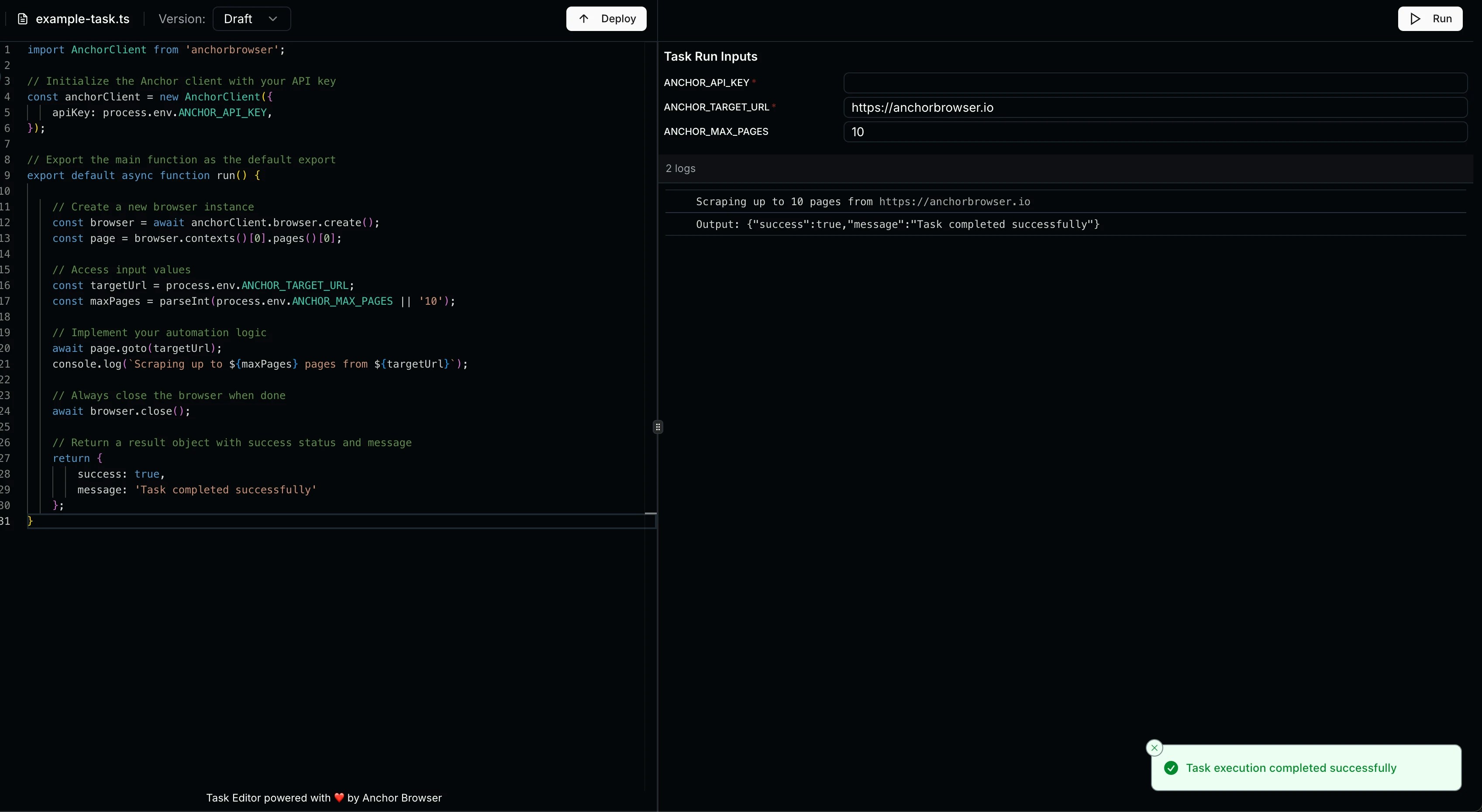
Basic Task Example
import AnchorClient from 'anchorbrowser';

// Initialize the Anchor client with your API key
const anchorClient = new AnchorClient({
    apiKey: process.env.ANCHOR_API_KEY,
});

// Export the main function as the default export
export default async function run() {

    // Create a new browser instance
    const browser = await anchorClient.browser.create();
    const page = browser.contexts()[0].pages()[0];

    // Access input values
    const targetUrl = process.env.ANCHOR_TARGET_URL;
    const maxPages = parseInt(process.env.ANCHOR_MAX_PAGES || '10');

    // Implement your automation logic
    await page.goto(targetUrl);
    console.log(`Scraping up to ${maxPages} pages from ${targetUrl}`);

    // Always close the browser when done
    await browser.close();

    // Return a result object with success status and message
    return {
        success: true,
        message: 'Task completed successfully'
    };
}
Using the SDK
Create your task in Anchor:
Save your typescript code as a .ts file
Make sure it follows the guidelines from above.
Get the base64 version of the file
Run the script to show your base64 file version# Convert your TypeScript file to base64
base64 -i your-task.ts
Create your Task in Anchor
import Anchorbrowser from 'anchorbrowser';

const client = new Anchorbrowser({
  apiKey: process.env.ANCHORBROWSER_API_KEY,
});

// Create a new task
const task = await client.task.create({
  name: 'example-task',
  language: 'typescript',
  description: 'A task to scrape product information from e-commerce sites',
  code: "<base64-string>" // Replace with the output of the last step.
});

const taskId = task.data.id
console.log('Task created:', taskId);
Running Tasks
// Run the task with inputs
const execution = await client.task.run({
  taskId: taskId,
  version: 'draft',
  inputs: {
    ANCHOR_TARGET_URL: 'https://example.com',
    ANCHOR_MAX_PAGES: '10'
  }
});

console.log('Task execution started:', execution.data);
By default, the browser session is automatically closed when the task ends. Set cleanupSessions: false to keep the session open after task execution.
Deploy Task
// Deploy the task to make it available for production use
const deployment = await client.task.deploy({
  taskId: taskId,
  code: "<base64-string>", // Replace with the base64 encoded code
  language: 'typescript',
  description: 'Optional description for this version'
});

console.log('Task deployed:', deployment.data);
Async Task
By default, task execution is synchronous - the API call waits for the task to complete before returning results. For long-running tasks, you can use asynchronous execution to start the task and check results later.
Running Tasks Asynchronously
When you set async: true, the API returns immediately with a confirmation that the task has started. You can then poll for execution results using the task execution history endpoint.
// Run the task asynchronously
const execution = await client.task.run({
  taskId: taskId,
  version: '1',
  async: true, // Enable async execution
  inputs: {
    ANCHOR_TARGET_URL: 'https://example.com',
    ANCHOR_MAX_PAGES: '10'
  }
});

console.log('Task execution started:', execution.data);
// Response: { async: true, success: true, message: 'Task execution started', taskId: '...' }
Checking Execution Results
After starting an async task, you can check its execution status and results by querying the task’s execution history endpoint:
// Get execution results
const response = await fetch(`https://api.anchorbrowser.io/v1/task/${taskId}/executions?page=1&limit=1&version=1`, {
  headers: {
    'anchor-api-key': process.env.ANCHORBROWSER_API_KEY,
    'Content-Type': 'application/json'
  }
});

const results = await response.json();
console.log('Execution results:', results.data);
{
  "data": {
    "results": [
      {
        "id": "550e8400-e29b-41d4-a716-446655440000",
        "status": "success",
        "executionTime": 5234,
        "output": "{\"success\": true, \"message\": \"Task completed successfully\"}",
        "errorMessage": null,
        "startTime": "2024-01-15T10:30:00Z"
      }
    ],
    "pagination": {
      "page": 1,
      "limit": 1,
      "total": 1,
      "totalPages": 1
    }
  }
}
Async task executions have a maximum duration of 3 hours. Tasks that exceed this limit will be automatically cancelled.Note: Tasks must be deployed (not just in draft) to appear in the execution results list.
Polling for Results
For async tasks, you can implement polling to wait for completion:
// Poll for task completion
async function waitForTaskCompletion(taskId: string, maxAttempts: number = 60) {
  for (let i = 0; i < maxAttempts; i++) {
    const response = await fetch(`https://api.anchorbrowser.io/v1/task/${taskId}/executions?page=1&limit=1`, {
      headers: {
        'anchor-api-key': process.env.ANCHORBROWSER_API_KEY,
        'Content-Type': 'application/json'
      }
    });

    const results = await response.json();
    const latestResult = results.data?.results?.[0];
    if (latestResult) {
      if (latestResult.status === 'success' || latestResult.status === 'failure') {
        return latestResult;
      }
    }

    // Wait 2 seconds before next poll
    await new Promise(resolve => setTimeout(resolve, 2000));
  }

  throw new Error('Task execution timeout');
}

// Usage
const execution = await client.task.run({
  taskId: taskId,
  version: '1',
  async: true,
  inputs: { ANCHOR_TARGET_URL: 'https://example.com' }
});

const result = await waitForTaskCompletion(taskId);
console.log('Task completed:', result);
Support
For additional help with the Tasks API:

